
Toggle Cube
OperatorDash Labs
Departed2026-09-30
Updated2026-09-30
Opens in a play window — no download required.
Reviews
Toggle Cube keeps its rules minimal: two-state cubes, an auto-walking character, and stars to reach. That simplicity makes it easy to start, but the later puzzles demand real planning because toggles must happen in the right order and at the right moment. The free desktop browser format suits short breaks. It is a good fit for casual players and logic-puzzle fans who prefer thinking over reflexes.
Description
Guiding an Auto-Walking Character
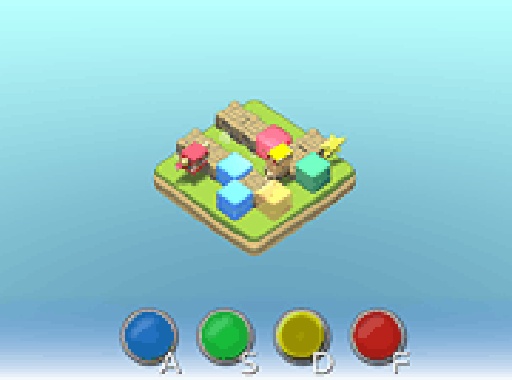
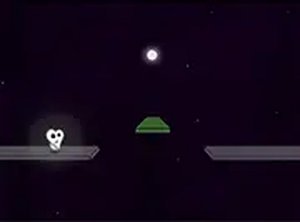
In Toggle Cube, you do not control the character directly. It walks along a set path on its own, and your only input is the state of the colored cubes scattered across the level. Each cube is either on or off, and the character responds to those states as it moves. The goal is simple to state: get the character safely to the stars without letting it fall into traps. Because the character never stops, every toggle has to happen at the right moment. [IMG_1]Two-State Cubes, One Correct Sequence
Every cube in Toggle Cube has exactly two states, on and off. Flipping a cube changes what the character does next, whether that means altering its direction or keeping it safe. A level is solved when you find the sequence of toggles that carries the character to the stars. The challenge comes from the order and timing of those toggles, not from complicated controls. You can experiment with different cube configurations to find the correct sequence, which makes trial and error a legitimate way to learn each puzzle.Progression and Difficulty
The puzzles start simple and grow more complex as you progress. Early levels let you see how cube states affect the character, while later ones demand more careful planning and tighter timing. The game is played directly in a desktop browser, so there is nothing to download or install. Colorful graphics and a clean interface keep the focus on solving puzzles rather than navigating menus.Who It Suits
Toggle Cube is suitable for all ages and skill levels. Casual players can enjoy the straightforward mechanics and bright presentation, while puzzle enthusiasts get a steady increase in difficulty. The free browser format makes it convenient for short sessions, and the game rewards patience and careful observation more than fast reflexes.Compatibility
Play on Any Device | Chrome / Safari / Edge Recommended
FAQ
Do I need to download anything to play Toggle Cube?
No. Toggle Cube runs directly in a desktop web browser. There is no download, installation, or account required, so you can start playing immediately after opening the page. This makes it easy to fit in short sessions whenever you have a few minutes.
Can I control the character directly in Toggle Cube?
No. The character moves automatically along its path. Your only control is toggling colored cubes between on and off states. The character reacts to those states as it walks, so your decisions shape its route indirectly rather than steering it manually.
What happens if I toggle a cube at the wrong time?
The character may fall into a trap or miss the stars, and the level will not be completed. Because the character moves continuously, timing matters as much as the order of toggles. You can restart and try a different sequence.
Is Toggle Cube suitable for children?
Yes. The game is designed to be suitable for all ages and skill levels. Its simple mechanics, colorful visuals, and clean interface make it accessible to younger players, while the later puzzles still offer a challenge for adults who enjoy logic games.
Does Toggle Cube get harder as you play?
Yes. The puzzles gradually increase in difficulty. Early levels help you understand how cube states affect the character, and later levels require more careful planning and timing. The progression is designed to provide a steady challenge without becoming overwhelming.
Can I play Toggle Cube on a phone or tablet?
The game is designed for desktop browsers. The input description mentions using a mouse or keyboard to click cubes, which points to a desktop setup. If you try it on a mobile device, the experience may not match the intended desktop controls.
Comments
Sign in to leave a note
You must be logged in before posting a review or rating.
No comments yet. Be the first to comment!




Editorial Notes