
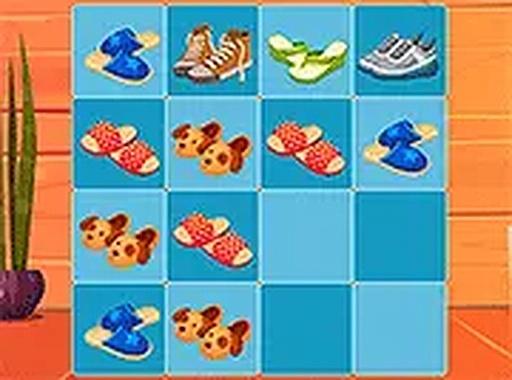
2048 Shoes Number Puzzle
Opens in a play window — no download required.
Reviews
2048 Shoes Number Puzzle does not attempt to reinvent the sliding-tile genre. Instead, it applies a consistent shoe motif to a proven 4x4 merge system, which keeps the learning curve flat for anyone who has played 2048 before. The absence of time pressure and the automatic browser save make it easy to return to a run. The main limitation is that the theme is purely visual; players looking for new mechanics will find the same strategic puzzle underneath.
Description
A Familiar Grid with a Shoe Theme
2048 Shoes Number Puzzle follows the same 4x4 sliding-tile structure that made the original 2048 a browser staple. Each tile carries a number and a shoe icon, so the board reads differently from the standard version without altering how merging works. The goal stays fixed: combine matching numbers until a 2048 tile appears. Because the shoe imagery is cosmetic, players who already know 2048 can transfer their habits immediately.
How Merging Drives the Score
Every swipe pushes all tiles as far as they can travel in one direction. When two tiles with the same number meet, they collapse into a single tile worth double the value, and the score rises with each merge. A move that produces no merge and no shift is not allowed, which means the board only changes when your input has a real effect. The grid fills gradually, and the run ends once no legal move remains. That constraint is what turns a simple swipe into a planning exercise.
Reading the Board Before You Swipe
Since new tiles appear after most moves, the order of your swipes matters more than raw speed. Keeping the highest tile anchored in a corner limits how many directions it can be pushed, which reduces the chance of scattering your progress. Lower tiles should be arranged so they can still merge into each other without forcing the big tile out of position. There are no time limits, so you can pause and trace the next few moves before committing.
Controls, Saving, and Device Support
The game runs in a browser on both desktop and mobile. On a computer you swipe with the mouse; on a touchscreen you drag a finger across the grid. A full-screen option removes surrounding page elements for a cleaner view. Progress is saved automatically in the browser, so closing the tab does not erase an unfinished board. The interface stays minimal, which keeps attention on the grid rather than on menus or overlays.
Compatibility
FAQ
Comments
Sign in to leave a note
You must be logged in before posting a review or rating.
No comments yet. Be the first to comment!


Editorial Notes