
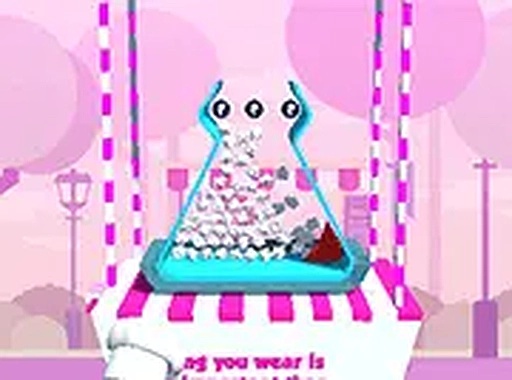
Pop Corn Fever Arcade Challenge
OperatorYacht Pixel Core
Departed2026-09-30
Updated2026-09-30
Opens in a play window — no download required.
Reviews
Pop Corn Fever Arcade Challenge keeps its scope narrow: hold, release, and adjust to a new tub shape each level. That simplicity is both its strength and its limit. Players who enjoy quick coordination tests will appreciate the immediate feedback and the way each shape forces a fresh timing judgment. Those seeking depth, progression systems, or multiplayer will find little here. It works best as a short-session browser game.
Description
Timing and Aim as Core Mechanics
Pop Corn Fever Arcade Challenge builds its entire challenge around two inputs: how long you hold the mouse button and when you let go. Holding fills the tub with popped kernels, but releasing at the wrong moment sends popcorn outside the container. There is no movement, no inventory, and no complex controls to learn. The difficulty comes from reading the tub's shape and judging the release point before the popcorn overshoots or falls short. It is a straightforward loop that rewards patience more than speed.How Changing Tub Shapes Alter Difficulty
Every level introduces a different tub shape, and that single variable reshapes the entire challenge. A wide, shallow tub tolerates a later release; a narrow or oddly angled one demands a tighter window. Because the shape changes each time, players cannot rely on muscle memory from the previous level. Instead, they must re-evaluate the container's dimensions and adjust their hold duration accordingly. This keeps the experience from becoming a single repeated motion and gives each attempt a distinct problem to solve.Controls and Platform Expectations
The game is optimized for desktop use, with mouse or keyboard recommended. Clicking and holding the left mouse button is the primary action. No downloads are required, and the game runs directly in a browser, which makes it suitable for short sessions or extended play. The bright colors and popping sound effects are designed to make the feedback loop satisfying, even when a release is mistimed.Who This Game Suits
Players who enjoy simple arcade challenges with a narrow skill ceiling will find the premise easy to grasp. The game is described as easy to pick up but hard to master, which means early levels are forgiving while later tub shapes punish careless timing. It is not a story-driven experience or a multiplayer game. It is a solo, score-oriented arcade title for anyone who wants a quick coordination exercise during a break.✅ Compatibility & Testing
• Desktop (Windows 11, macOS Ventura)
• Mobile (iPhone 14, Samsung Galaxy S23)
• Tablet (iPad Pro, Android tablet)
✅Supported browsers: Chrome, Safari, Edge, Firefox (latest versions)
❌ Not supported: Internet Explorer, older browser versions
FAQ
What is the main goal in Pop Corn Fever Arcade Challenge?
The objective is to fill a popcorn tub with popped kernels. You click and hold the mouse button to pop the popcorn, then release at the right moment so the kernels land inside the tub. Each level gives you a different tub shape, and the challenge is to fill it without spilling.
Does Pop Corn Fever Arcade Challenge require a download or installation?
No. The game runs directly in a web browser, so you do not need to download or install anything. It is designed for desktop use, and a mouse or keyboard is recommended for the click-and-hold control scheme. This makes it easy to start a session without waiting for a download.
What makes the levels different from each other?
Each level introduces a new tub shape. Because the container changes, the timing window for releasing the popcorn also changes. A wider tub may accept an earlier or later release, while a narrower or angled tub requires more precision. The variety comes from adapting to each new shape.
Is Pop Corn Fever Arcade Challenge difficult for beginners?
The game is designed to be easy to pick up, so the basic click-and-hold action is simple to understand. However, it is also described as hard to master because the changing tub shapes demand accurate release timing. Beginners can start quickly, but consistent accuracy takes practice.
Can I play Pop Corn Fever Arcade Challenge on a mobile device?
The game is optimized for desktop use, with a mouse or keyboard recommended. The input method is clicking and holding the left mouse button, which suggests a desktop-first design. The description does not state official mobile support, so playing on a phone or tablet may not provide the intended experience.
What kind of player will enjoy this arcade game?
It suits players who like short, skill-based arcade challenges that focus on timing and hand-eye coordination. The bright visuals and popping sounds create a light, satisfying feedback loop. It is a solo experience, so those looking for multiplayer or story content may find it too simple.
Comments
Sign in to leave a note
You must be logged in before posting a review or rating.
No comments yet. Be the first to comment!

Editorial Notes