
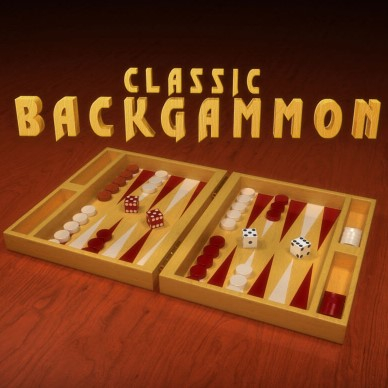
Traditional Backgammon Online
Opens in a play window — no download required.
Reviews
Traditional Backgammon Online delivers the classic board game without unnecessary changes. The rules remain intact, and the move-highlighting interface lowers the barrier for newcomers. Local multiplayer works well for shared-device sessions, while the AI opponent offers solo practice. The main limitation is the lack of online play against distant friends. If you want a straightforward, family-friendly backgammon game that runs in a browser, this fits the bill.
Description
Classic Backgammon Rules, Browser-Ready
Traditional Backgammon Online preserves the rules and strategic depth of the physical board game. Your objective is to move every piece around the board and into your home area before your opponent completes the same task. The game runs in a browser on PCs, mobile phones, and tablets, so a match is available whenever you have a few minutes. The interface highlights possible moves, which keeps the focus on decisions rather than on remembering legal placements.
Playing Against AI or a Friend
Two modes are available. You can face a computer opponent or challenge a friend on the same keyboard. In local play, each person selects a chip color before the match begins. Turns alternate based on dice rolls, and the numbers rolled determine how many spaces a piece can move. Because both players share one device, this mode works well for quick sessions at home without needing separate accounts or an internet connection beyond loading the page.
Dice, Blocking, and Knock-Offs
Dice rolls dictate movement, but strategy decides the outcome. You can block your opponent's progress by positioning pieces to limit their legal moves. If your opponent lands on a space occupied by a single piece, that piece is knocked off the board and must re-enter, which can shift momentum quickly. Planning several turns ahead—deciding when to play aggressively and when to protect your pieces—matters as much as the numbers you roll.
Who This Suits
The game is designed for a family audience and is listed as appropriate for ages 3 and up. Newcomers can learn through clear instructions and the move-highlighting interface, while experienced backgammon players will find the standard rules intact. The mix of luck and skill means matches stay unpredictable, and the casual pace makes it easy to fit a game into a short break or a longer evening session.
Compatibility
FAQ
Comments
Sign in to leave a note
You must be logged in before posting a review or rating.
No comments yet. Be the first to comment!







Editorial Notes