
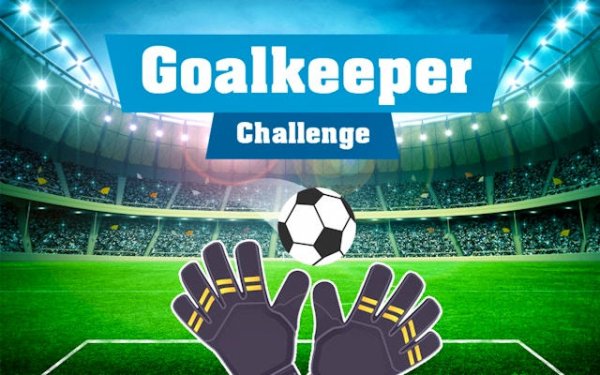
Net Guardian: Reflex Soccer
OperatorNymph Reapers
Departed2026-10-01
Updated2026-10-01
Opens in a play window — no download required.
Reviews
Net Guardian: Reflex Soccer strips soccer down to its most tense moment: the save. The one-touch control scheme and escalating shot speed create a loop that is easy to start but hard to master. The global leaderboard adds replay value, and the short sessions suit players who want a quick reflex challenge. Its minimal presentation keeps the focus on the ball, though players seeking full-match soccer will find it narrow in scope.
Description
Goalkeeping on Reflex
Net Guardian: Reflex Soccer hands you the gloves and nothing else. Your job is simple: keep the ball out of the net. You slide the goalkeeper left or right and trigger dives to intercept shots, using either a mouse or a touchscreen. The control scheme stays deliberately minimal so your attention goes to reading the ball's path rather than memorising button combinations. Every blocked shot adds to your score, and the game records your best runs so you can measure improvement over time.Shots That Keep You Guessing
Each session starts with slower, more predictable shots that give you room to adjust. As you continue, the pace climbs. Attempts arrive from different angles and at higher speeds, demanding sharper anticipation. This gradual ramp-up means newcomers can enjoy early saves while experienced players face genuine pressure in later stages. Because the shot patterns vary, no two sessions unfold the same way. The game ends when you miss a set number of saves, so consistency matters as much as quick reactions.Clean Pitch, Clear Feedback
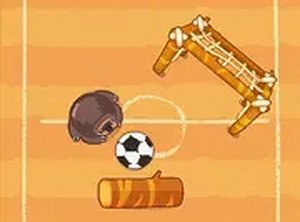
Bright, uncluttered graphics keep the ball, goalkeeper, and net easy to track against the pitch. Sound effects fire on every save or goal, giving immediate feedback that reinforces the moment-to-moment action. There are no complex menus or lengthy load times, so a new attempt starts almost instantly—useful when you only have a few minutes to play.Chasing the Leaderboard
A global leaderboard lets you compare your top scores with other players, adding motivation beyond beating your own record. Since each run is short, you can attempt several in one sitting and refine your technique. The leaderboard updates regularly, so there is always a fresh target to aim for.Compatibility
✅ Works on PC & Mobile | Recommended: Chrome / Safari / Edge
FAQ
What controls does Net Guardian: Reflex Soccer use?
The game supports mouse and touchscreen input. You slide the goalkeeper left or right and perform dives to intercept the ball. The scheme is intentionally simple, so you focus on reading the ball's trajectory instead of memorising button combinations.
How does a session end in Net Guardian: Reflex Soccer?
Each session continues until you miss a certain number of saves. Because shot patterns vary, no two sessions are exactly alike. The short round length makes the game suitable for quick breaks, while the scoring system still rewards longer, consistent play.
Does Net Guardian: Reflex Soccer have a leaderboard?
Yes. A global leaderboard lets you compare your top scores with other players. It updates regularly, so there is always a new target to aim for. Since each run is short, you can attempt multiple sessions in one sitting and gradually refine your technique.
Is Net Guardian: Reflex Soccer difficult for beginners?
Early shots travel in predictable patterns, giving you time to adjust, so beginners can enjoy early successes. As you progress, shots come from different angles and at greater speed, requiring sharper anticipation. The gradual ramp-up keeps later stages demanding for experienced players without overwhelming new participants.
What makes Net Guardian: Reflex Soccer different from other soccer games?
It focuses entirely on goalkeeper duties rather than full-pitch play. You slide and dive to block shots, and the game tracks your best runs to encourage personal improvement. The minimal controls and quick sessions set it apart from simulation-style soccer titles.
Can I play Net Guardian: Reflex Soccer on mobile devices?
The game supports touchscreen input, which suggests it is playable on mobile devices. It also supports mouse controls, so it works on desktop. The straightforward control scheme translates well to either input method, letting you play in short bursts.
Comments
Sign in to leave a note
You must be logged in before posting a review or rating.
No comments yet. Be the first to comment!

Editorial Notes