
Numerical Launch Challenge
Opens in a play window — no download required.
Reviews
Numerical Launch Challenge turns arithmetic drills into a timed space launch, where each correct answer fuels your rocket's ascent. The adaptive difficulty system keeps problems appropriately challenging, and the visual feedback—intensifying exhaust flames, a rising spacecraft—makes progress tangible. Because it runs in any modern browser and tracks personal bests without leaderboards, it suits learners who want low-pressure, regular math practice. The main limitation is its narrow scope: it focuses purely on arithmetic speed and accuracy, so players seeking broader math concepts or multiplayer competition will need to look elsewhere.
Description
Rapid-Fire Arithmetic Meets Rocket Science
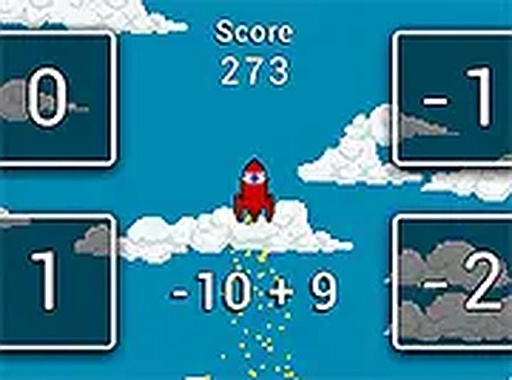
Numerical Launch Challenge presents a math problem on screen and asks you to type the correct answer before time expires. Each correct response adds thrust to a spacecraft, pushing it higher into the sky. Speed matters as much as accuracy: faster answers generate more momentum. This design turns routine arithmetic practice into a race against the clock, where hesitation costs altitude.
Adaptive Difficulty That Grows With You
The game monitors your performance and adjusts problem complexity in real time. Beginners see simple addition and subtraction, while players who maintain consistent accuracy progress to multiplication and division. The difficulty curve avoids sudden spikes, keeping you in a productive zone where challenges feel achievable but not trivial. This makes the game suitable for a wide range of ages and skill levels.
Visual Feedback and Atmosphere
Colorful graphics and smooth animations accompany each launch attempt. The spacecraft rises through a starry backdrop, and exhaust flames intensify as you answer correctly. A wrong answer causes a brief slowdown rather than a harsh penalty, providing clear feedback without discouraging you. The cheerful aesthetic makes the learning process feel more like play than study. A full-screen mode is available for a more focused environment.
Accessibility and Progress Tracking
No downloads or installations are required. The game runs directly in any modern web browser on desktop computers and mobile devices. Touch controls work on tablets and phones, while keyboard input functions seamlessly on laptops and desktops. A built-in progress tracker records your highest altitude and average response time across sessions, helping you see tangible improvement over days or weeks. The game does not use leaderboards or competitive rankings, focusing instead on personal growth.
Compatibility
FAQ
Comments
Sign in to leave a note
You must be logged in before posting a review or rating.
No comments yet. Be the first to comment!





Editorial Notes