
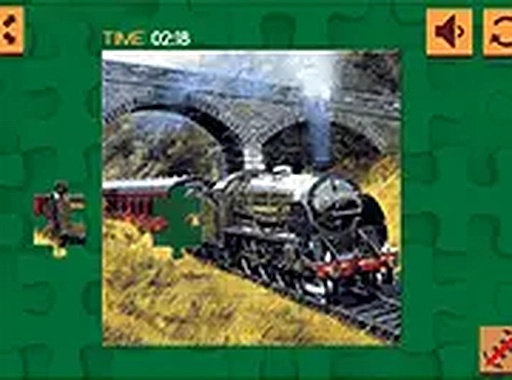
Railway Scenes Jigsaw Puzzle
Opens in a play window — no download required.
Reviews
Railway Scenes Jigsaw Puzzle delivers exactly what its name suggests: six train-themed images assembled by dragging pieces into place. The four piece counts, from 16 to 100, let you control session length, and the absence of timers keeps the experience relaxed. Auto-save and browser compatibility make it convenient for short breaks. The main limitation is variety: six images and one core mechanic mean the appeal depends on how much you enjoy traditional jigsaws. It suits casual players and puzzle enthusiasts who want a low-pressure mental activity.
Description
What You Assemble
Railway Scenes Jigsaw Puzzle is built around six train-themed images. Each picture shows scenic railways or classic locomotives, and your only job is to place every piece correctly to reveal the finished scene. The game runs in a web browser, so there is nothing to download and no account to create. It works on desktop and mobile, which makes it easy to start a puzzle during a break and return to it later.
Piece Counts and Pace
Before starting an image, you pick a difficulty by choosing a piece count: 16, 36, 64, or 100. The 16-piece option suits a quick session, while 100 pieces turns the same picture into a longer project. There are no timers or move limits. Pieces sit scattered on the screen, and you drag each one into position. A preview shows the full image as a guide, and some puzzles may allow rotating pieces for placement. The game saves your progress automatically, so closing the tab does not erase unfinished work.
Controls and Comfort
The interface is clean and the controls are simple: select an image, choose a piece count, then drag and drop. Because the game supports full screen mode, you can enlarge the board when smaller pieces become hard to distinguish. The content is family-friendly and designed to suit all ages. There is no pressure to finish quickly, and the relaxed pace is the point rather than a side effect.
Approaches That Help
Starting with the 16-piece puzzles makes sense if you are new to the controls or the image style. Sorting pieces by color or edge pattern speeds up assembly, and checking the preview often keeps you from forcing a piece into the wrong spot. If you feel stuck, stepping away and coming back with fresh eyes often helps. Regular practice improves pattern recognition, but the game does not require it.
Compatibility
FAQ
Comments
Sign in to leave a note
You must be logged in before posting a review or rating.
No comments yet. Be the first to comment!




Editorial Notes